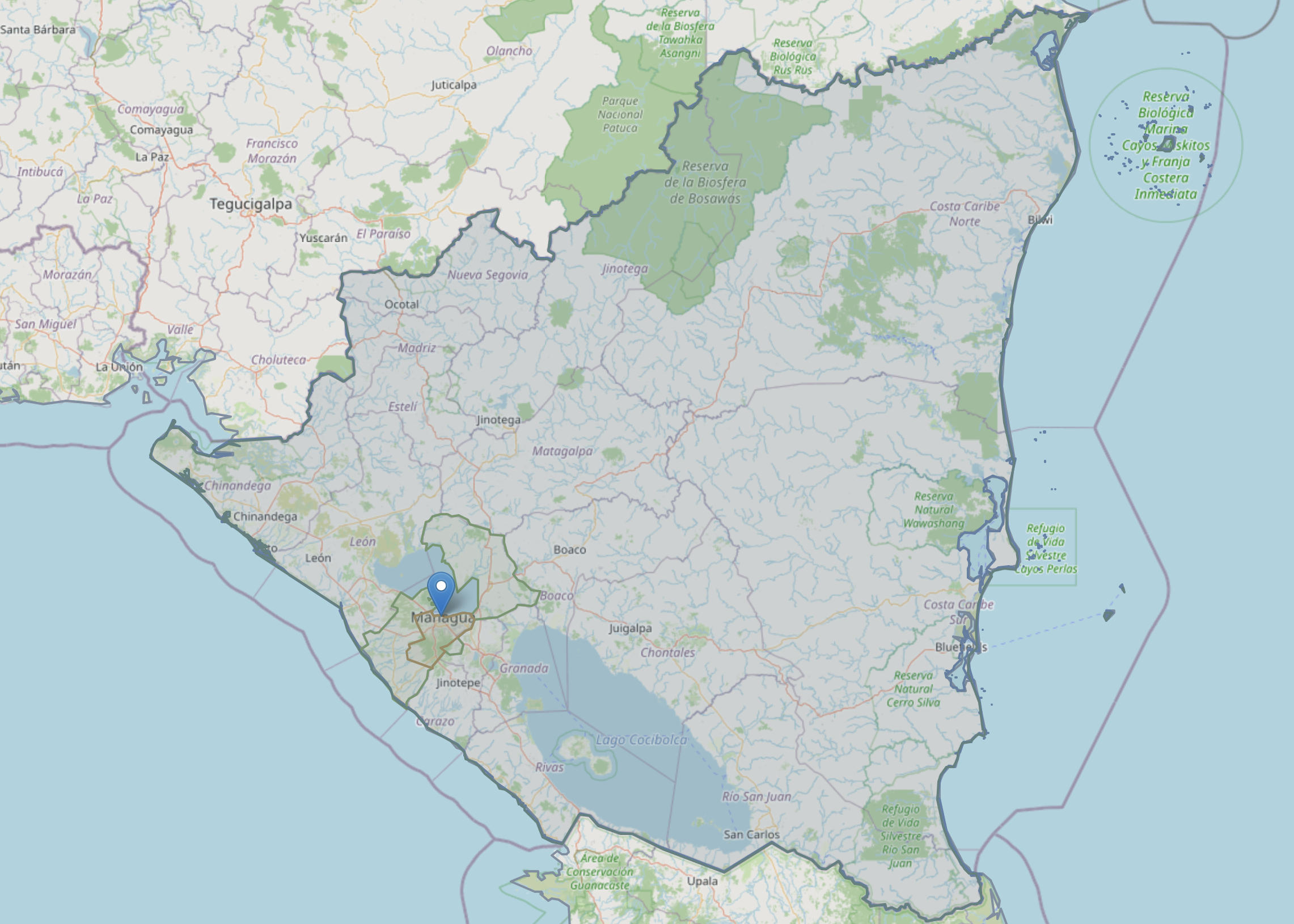
I created a fairly simple point-in-polygon reverse geocoder, which is now live at
https://reverse-geocoder.stepps00.io
This site uses the Who’s On First combined parquet file hosted by Geocode.Earth to provide the point-in-polygon response. When clicking the map, a list of Who’s On First places, sorted by placetype, appear along with an option to display their geometries.
Eventually, I’d like to add divisions theme data from Overture Maps as another results option. This requires schema changes to the postgres database I’m using to serve results, but I’d like multiple source options in the results pane.
For now, the setup looks like this:
reverse-geocoder.stepps00.io= the hosted frontend map app on Renderapi.stepps00.io= the hosted API on RenderRender Postgres db= the database that stores the imported geospatial dataGitHub repo= where the code lives (private for now)
For what it’s worth, here’s a simplified step-by-step guide of how I moved this from a local project to my site:
1. Figure out what needs to be supported
This needs to have three main parts:
- A frontend map page
- A backend API
- A Postgres/PostGIS database holding the geographic data
2. Decide on the hosting setup
I used:
- GitHub for the code
- Render for hosting
- WordPress.com for the page on
stepps00.io
Why Render?
I needed a real database, a real API server, and a static frontend host. Render seemed to fit the bill, though I’m sure there are other great options out there.
3. Put the code into GitHub
I built the frontend, FastAPI backend, and local PostGIS workflow locally, and loaded a small sample parquet for testing. I then pushed that code to GitHub.
4. Confirm WordPress capabilities
This is a WordPress site, which means:
- WordPress hosts the page
- WordPress page embeds or links to the hosted app
- Render hosts the app on a subdomain
I just needed to confirm WordPress could properly manage DNS records, which it could.
5. Create the Render Postgres database
In Render:
New -> Postgres
Then I loaded database schema I was using locally:
CREATE EXTENSION IF NOT EXISTS postgis;CREATE TABLE IF NOT EXISTS places ( id BIGINT PRIMARY KEY, parent_id BIGINT, name TEXT, placetype TEXT, country TEXT, lat DOUBLE PRECISION, lon DOUBLE PRECISION, geom GEOMETRY(Geometry, 4326) NOT NULL, bbox GEOMETRY(Polygon, 4326));CREATE INDEX IF NOT EXISTS idx_places_geom_gist ON places USING GIST (geom);CREATE INDEX IF NOT EXISTS idx_places_bbox_gist ON places USING GIST (bbox);CREATE INDEX IF NOT EXISTS idx_places_placetype ON places (placetype);CREATE INDEX IF NOT EXISTS idx_places_country ON places (country);
Important notes:
geomstores the main feature geometry in EPSG:4326bboxstores the feature bounding box as a polygon
6. Create the Render API service
In Render:
New -> Web Service- Connect to GitHub, choose the relevant GitHub repo
- Use the Docker option and point Render at
api/Dockerfile
Then in the API service:
- Go to
Environment - Add
DATABASE_URL - Use the Render Postgres Internal Database URL
7. Add the API custom domain
In the API service:
Settings -> Custom Domains- add
api.stepps00.io
In WordPress.com DNS, create:
CNAME api -> the Render hostname shown in the API service settings
8. Create the frontend static site
In Render:
New -> Static Site- Choose the same GitHub repo
- Deploy the frontend from the repo’s
webfolder
9. Add the frontend custom domain
In the frontend static site:
- add
reverse-geocoder.stepps00.io
In WordPress.com DNS, create:
CNAME reverse-geocoder -> the Render hostname shown in the frontend service settings
10. Wait for DNS verification and SSL certificates
Both subdomains needed a few minutes for:
- verification
- SSL certificates
11. Import the parquet into Render Postgres
I hit quite a few snags here, mostly related to connection failures and Render database limits. The working solution was to upgrade the database, then use a Python importer that loaded the parquet in smaller retryable batches.
I used that Python script to import the local parquet file into my Render Postgres database. Once the data was in Postgres, the site could query it through the API.
Important notes:
- The
Basic-256mboption on Render was fine for testing with a sample parquet, but too small to handle the global parquet import - The import of the global parquet only completed once the database was upgraded to Render’s
1 GB RAM / 0.5 CPUoption.
12. Improve the site after deployment
Once I had the scaffolding in place, I was able to make improvements to the site.
- Removed a janky nearby-points option that never seemed to work correctly
- Split text results from geometry loading. This was a big one. Using a small sample parquet locally, I had no load time issues when loading name/placetype results and geometries at the same time. But when I scaled this up to use the global parquet, the result load time was incredibly slow. Splitting the name/placetype results from the geometry loading, and making geometry display optional, improved load times drastically.
- Changed the geometry color scheme various times. This was harder to nail down than I thought it’d be.
- Played around with map tile options, but defaulted back to the initial OpenStreetMap choice
- Added some zoom-based geometry simplification. I’m not entirely sure the implementation today is the best approach, but it has improved response time.
Takeaways and Next Steps
- Render was easy to use, has clean documentation, and I was able to learn quite a bit as I figured the API and postgres database details out
- DNS setup was easy to get wrong
- These sorts of large PostGIS imports depend heavily on DB RAM/CPU, not just storage, which made the initial imports to postgres tricky
- Splitting the name/placetype response from the geometry response (and making that optional) sped up load times substantially
A simple point-in-polygon reverse geocoding project has been on my mind for quite some time, so I’m happy I was able to get this working and publish a working version. Next up:
- Adding additional data sources to make this truly “multi-source”: Overture Maps, divisions data, Protected-Areas-Data, admin0-2 from LISB, World Bank, and geoBoundaries
- Adding the ability to query lat/lng values, or paste them in to derive the map pin
- Adding back the nearby-points option, less buggy this time
- Improving geometry simplification
- ?
Leave a Reply